Docker status in the Ubuntu MOTD
I have several Ubuntu servers running Docker, and wanted a quick summary of the Docker environment whenever I logged in using SSH.
I could run docker ps, but most of the time I only need to know whether the containers are running and healthy.
The Ubuntu Message of the Day (MOTD) is a convenient place to display that information.
There was one minor problem with my original script: it looked fine in a dark terminal, but several colors were difficult to read when I used a light terminal.
The solution was to let the terminal select its normal foreground color for most of the display. Red and green are only used when they communicate useful status information.
What the Docker MOTD displays
The script displays:
- Overall Docker status
- Running and stopped containers
- Paused, restarting, created, or dead containers
- Docker health-check results
- Docker Compose project count
- Image count
- Volume count
- Custom Docker network count
Examples / screenshots
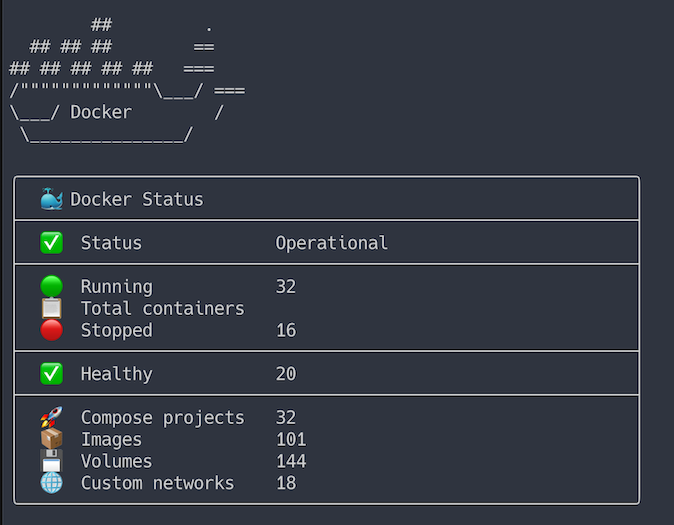
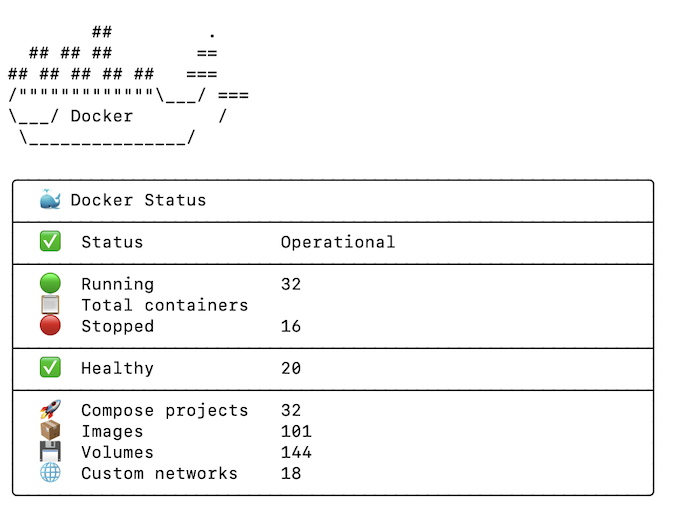
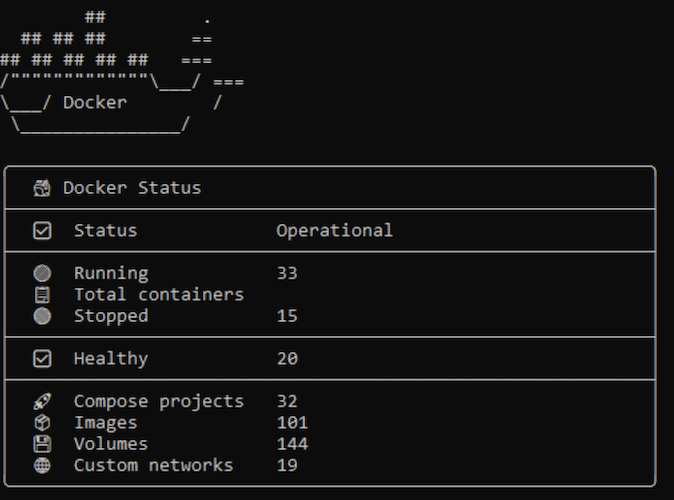
The Docker commands have two-second timeouts so a slow or unavailable Docker daemon does not delay an SSH login.
If Docker is unavailable, the Docker section is not displayed.
Docker MOTD script
Create a new Ubuntu MOTD script:
sudo vim /etc/update-motd.d/50-docker-status
Add the following:
#!/usr/bin/env bash

# Fast Docker MOTD for Ubuntu 24.04
# Designed to avoid slowing down interactive SSH logins.
# Uses the terminal's default foreground color so it remains readable
# with both light and dark terminal backgrounds.

command -v docker >/dev/null 2>&1 || exit 0
command -v timeout >/dev/null 2>&1 || exit 0

# Presentation styles
RESET='\033[0m'
BOLD='\033[1m'

# Use colors only when they convey status.
RED='\033[1;31m'
GREEN='\033[1;32m'

# Background-independent styles use the terminal's default foreground.
LABEL="$BOLD"
BORDER="$BOLD"
INFO="$BOLD"
MUTED="$RESET"

# Honor NO_COLOR and terminals without ANSI color support.
if [[ -n ${NO_COLOR+x} || ${TERM:-dumb} == dumb ]]; then
    RESET=''
    BOLD=''
    RED=''
    GREEN=''
    LABEL=''
    BORDER=''
    INFO=''
    MUTED=''
fi

# Query all containers once.
#
# Fields:
#   State | Status | Compose project
if ! CONTAINER_DATA=$(
    timeout 2s docker ps -a \
        --format '{{.State}}|{{.Status}}|{{.Label "com.docker.compose.project"}}' \
        2>/dev/null
); then
    # Do not display the Docker MOTD if the daemon is unavailable
    # or unresponsive.
    exit 0
fi

read -r \
    RUNNING \
    STOPPED \
    PAUSED \
    RESTARTING \
    CREATED \
    DEAD \
    HEALTHY \
    UNHEALTHY \
    HEALTH_STARTING \
    COMPOSE_PROJECTS \
    <<< "$(
        awk -F'|' '
            {
                state=tolower($1)
                status=tolower($2)
                project=$3

                if (state == "running") {
                    running++
                } else if (state == "exited") {
                    stopped++
                } else if (state == "paused") {
                    paused++
                } else if (state == "restarting") {
                    restarting++
                } else if (state == "created") {
                    created++
                } else if (state == "dead") {
                    dead++
                }

                if (status ~ /\(healthy\)/) {
                    healthy++
                } else if (status ~ /\(unhealthy\)/) {
                    unhealthy++
                } else if (status ~ /\(health: starting\)/) {
                    health_starting++
                }

                if (project != "") {
                    projects[project]=1
                }
            }

            END {
                project_count=0

                for (project in projects) {
                    project_count++
                }

                printf "%d %d %d %d %d %d %d %d %d %d\n",
                    running,
                    stopped,
                    paused,
                    restarting,
                    created,
                    dead,
                    healthy,
                    unhealthy,
                    health_starting,
                    project_count
            }
        ' <<< "$CONTAINER_DATA"
    )"

TOTAL=$((RUNNING + STOPPED + PAUSED + RESTARTING + CREATED + DEAD))

# These lightweight queries have strict time limits.
IMAGES=$(
    timeout 2s docker image ls -q 2>/dev/null |
        sort -u |
        awk 'NF { count++ } END { print count+0 }'
)

VOLUMES=$(
    timeout 2s docker volume ls -q 2>/dev/null |
        awk 'NF { count++ } END { print count+0 }'
)

NETWORKS=$(
    timeout 2s docker network ls \
        --format '{{.Name}}' 2>/dev/null |
        awk '
            $0 != "bridge" &&
            $0 != "host" &&
            $0 != "none" {
                count++
            }

            END {
                print count+0
            }
        '
)

# Use zero if an optional query timed out or returned invalid output.
[[ "$IMAGES" =~ ^[0-9]+$ ]] || IMAGES=0
[[ "$VOLUMES" =~ ^[0-9]+$ ]] || VOLUMES=0
[[ "$NETWORKS" =~ ^[0-9]+$ ]] || NETWORKS=0

# Determine the overall Docker status.
if (( UNHEALTHY > 0 || RESTARTING > 0 || DEAD > 0 )); then
    STATUS_ICON="❗"
    STATUS_TEXT="Attention required"
    STATUS_STYLE="$RED"
elif (( RUNNING > 0 )); then
    STATUS_ICON="✅"
    STATUS_TEXT="Operational"
    STATUS_STYLE="$GREEN"
else
    STATUS_ICON="ℹ️"
    STATUS_TEXT="No running containers"
    STATUS_STYLE="$INFO"
fi

# Print a bordered dashboard row.
#
# The dashboard has a 60-column interior:
#   2 leading spaces
#   2-column icon
#   2 spaces
#   18-column label
#   1 space
#   35-column value
print_row() {
    local icon="$1"
    local label="$2"
    local value="$3"
    local style="${4:-$RESET}"

    printf "${BORDER}│${RESET}  %s  ${LABEL}%-18s${RESET} ${style}%-35s${RESET}${BORDER}│${RESET}\n" \
        "$icon" "$label" "$value"
}

print_separator() {
    printf "${BORDER}├────────────────────────────────────────────────────────────┤${RESET}\n"
}

printf '\n'

# Docker logo
printf "${BOLD}"
printf '        ##         .\n'
printf '  ## ## ##        ==\n'
printf '## ## ## ## ##   ===\n'
printf '/"""""""""""""\___/ ===\n'
printf '\___/ Docker        /\n'
printf ' \_______________/\n'
printf "${RESET}"

printf '\n'

# Dashboard header
printf "${BORDER}╭────────────────────────────────────────────────────────────╮${RESET}\n"
printf "${BORDER}│${RESET}  🐳 ${BOLD}%-55s${RESET}${BORDER}│${RESET}\n" \
    "Docker Status"

print_separator

# Overall status
print_row "$STATUS_ICON" "Status" "$STATUS_TEXT" "$STATUS_STYLE"

print_separator

# Container counts
print_row "🟢" "Running" "$RUNNING" "$GREEN"
print_row "📋" "Total containers" "$TOTAL"

(( STOPPED > 0 )) &&
    print_row "🔴" "Stopped" "$STOPPED" "$RED"

(( PAUSED > 0 )) &&
    print_row "⏸️" "Paused" "$PAUSED" "$INFO"

(( RESTARTING > 0 )) &&
    print_row "🔄" "Restarting" "$RESTARTING" "$RED"

(( CREATED > 0 )) &&
    print_row "🆕" "Created" "$CREATED" "$INFO"

(( DEAD > 0 )) &&
    print_row "💀" "Dead" "$DEAD" "$RED"

print_separator

# Container health
(( HEALTHY > 0 )) &&
    print_row "✅" "Healthy" "$HEALTHY" "$GREEN"

(( UNHEALTHY > 0 )) &&
    print_row "❌" "Unhealthy" "$UNHEALTHY" "$RED"

(( HEALTH_STARTING > 0 )) &&
    print_row "⏳" "Health starting" "$HEALTH_STARTING" "$INFO"

if (( HEALTHY == 0 && UNHEALTHY == 0 && HEALTH_STARTING == 0 )); then
    print_row "➖" "Health checks" "None configured" "$MUTED"
fi

print_separator

# Docker resources
print_row "🚀" "Compose projects" "$COMPOSE_PROJECTS"
print_row "📦" "Images" "$IMAGES"
print_row "💾" "Volumes" "$VOLUMES"
print_row "🌐" "Custom networks" "$NETWORKS"

# Dashboard footer
printf "${BORDER}╰────────────────────────────────────────────────────────────╯${RESET}\n"
printf '\n'
Save the file and make it executable:
sudo chmod 755 /etc/update-motd.d/50-docker-status
Light and dark terminal backgrounds
The original version used bright blue, cyan, yellow, magenta, white, and gray throughout the display.
Those colors looked good with my dark terminal theme, but bright colors—especially white, cyan, and yellow—were difficult to read against a light background.
This version uses the terminal's default foreground color for:
- The border
- The Docker logo
- Labels
- Informational values
- Paused and starting states
The terminal already selects a suitable default foreground color for its configured background. That makes the display work without trying to determine whether the terminal is using a light or dark theme.
Red and green remain because they communicate state, but the icons and text also communicate the same information if the colors are unavailable.
Disable color
The script recognizes the NO_COLOR environment variable.
To test the MOTD without ANSI color or bold formatting:
NO_COLOR=1 /etc/update-motd.d/50-docker-status
Color is also disabled automatically when TERM is set to dumb.
A note about emoji alignment
Emoji display width is not completely consistent between terminal applications.
The script assumes each status icon uses two terminal columns, which works with most modern terminal emulators. If the right border is shifted in a particular terminal, replace the emoji with single-width ASCII characters.
For example:
print_row "+" "Running" "$RUNNING" "$GREEN"
print_row "-" "Stopped" "$STOPPED" "$RED"
print_row "!" "Unhealthy" "$UNHEALTHY" "$RED"
Not quite as pretty, but completely predictable.